
The Klaviyo integration lets you sync spin wheel subscribers, route winners into separate lists, and trigger personalized prize flows — including a confirmation email with each customer's discount code after they spin. PopupBoost sends the event triggers and subscriber data; you build the actual emails and automations inside Klaviyo.
Step 1 — Connect Klaviyo
In Klaviyo — create your API key:
Create a Private API key
Give it these permissions — they're all that's needed:
Profiles
Lists
Events
In PopupBoost:
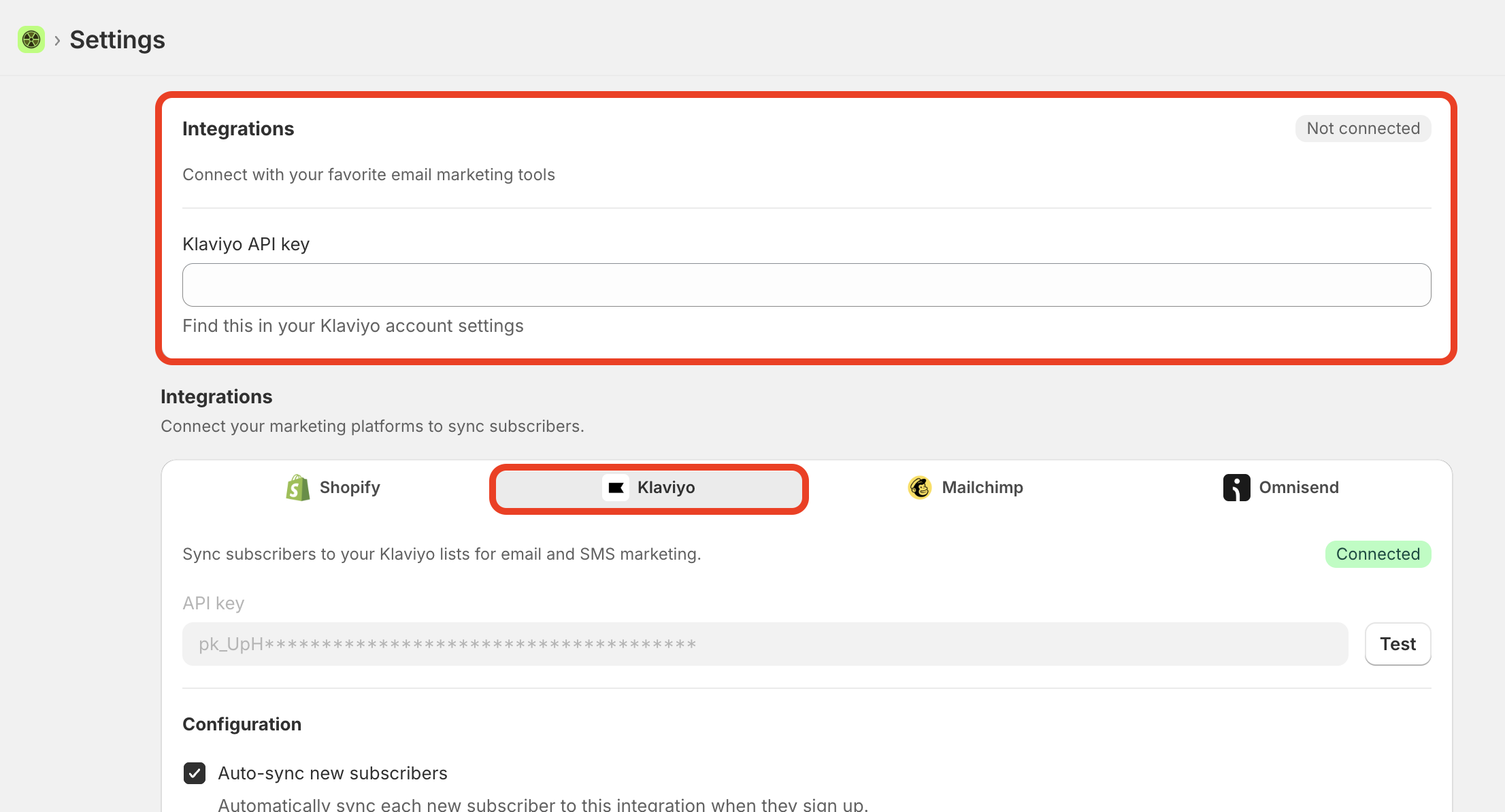
Go to Settings → Integrations and open the Klaviyo tab
Paste your API key, then click Test — when it succeeds you'll see the Connected badge
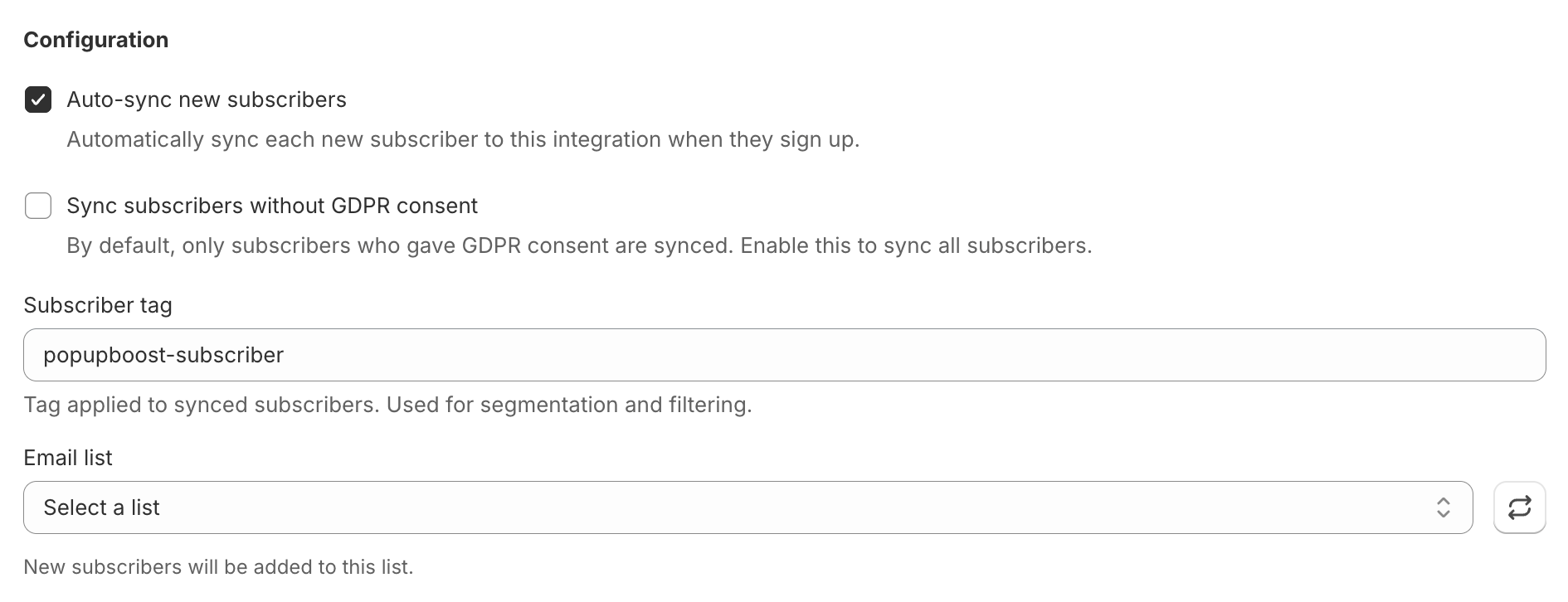
Configure your options:
Auto-sync new subscribers — syncs each new subscriber automatically on sign-up
Sync subscribers without GDPR consent — by default only GDPR-consented subscribers are synced; enable this to sync all
Subscriber tag — the tag applied to every synced subscriber (default:
popupboost-subscriber), used for segmentation and filtering in KlaviyoEmail list — your default list; all subscribers sync here unless a slice-level list overrides it
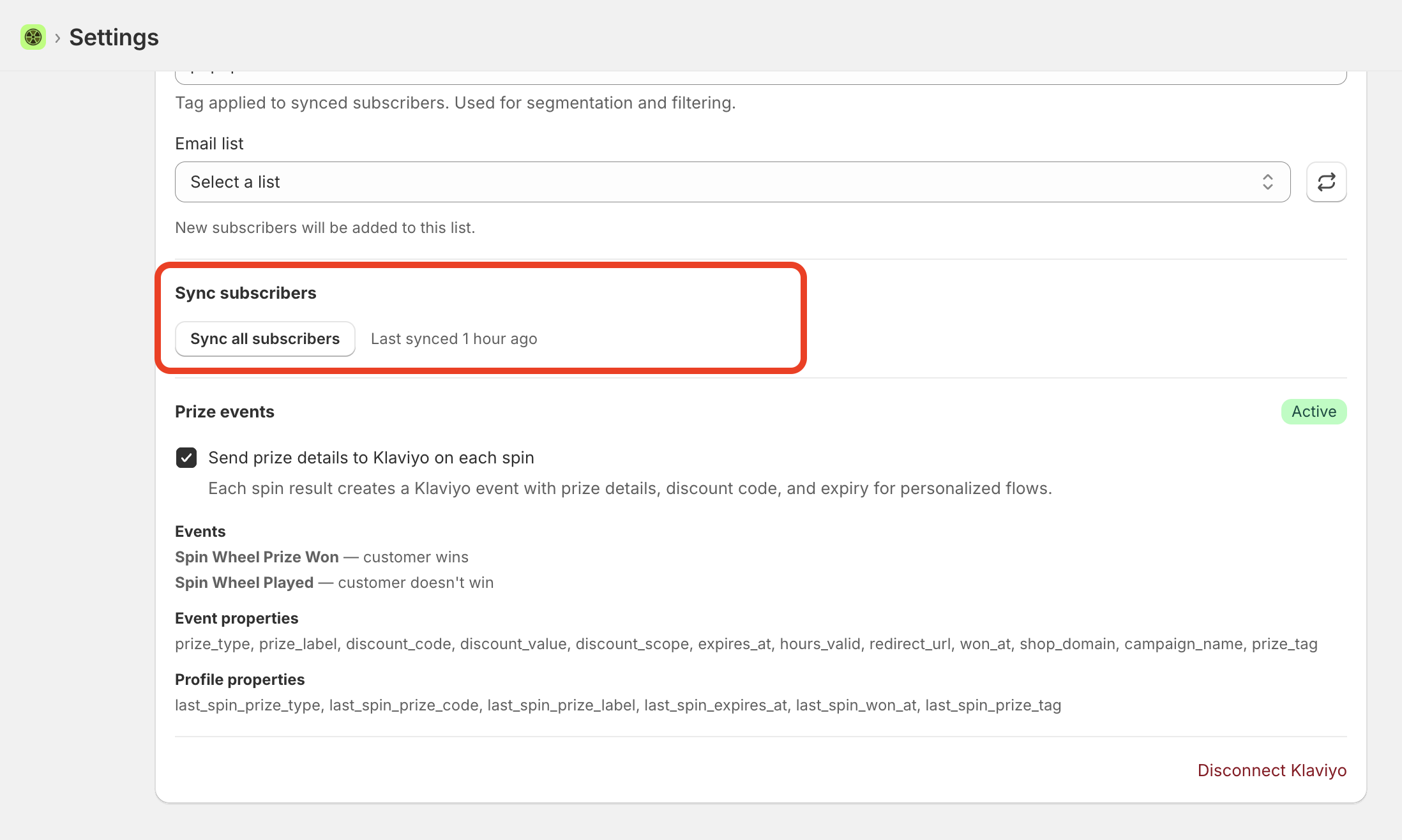
Click Sync all subscribers to push your existing list. This is also the manual sync — use it any time to re-push subscribers; the page shows when it last synced.
👉 Note: The default list is the fallback. Any subscriber from a slice without its own list assigned will land here.
Step 2 — Send a confirmation email with the discount code after each spin
This is the most common use case. PopupBoost doesn't send the email itself — it sends the event trigger and prize data to Klaviyo, and you build the email in a Klaviyo flow. This gives you full control over the design, timing, and content.
In PopupBoost → Settings → Integrations → Klaviyo:
Enable Send prize details to Klaviyo on each spin (under Prize events — you'll see it marked Active). Every spin now creates a Klaviyo event carrying the prize details, discount code, and expiry.
Two events are tracked:
Spin Wheel Prize Won — customer wins
Spin Wheel Played — customer doesn't win
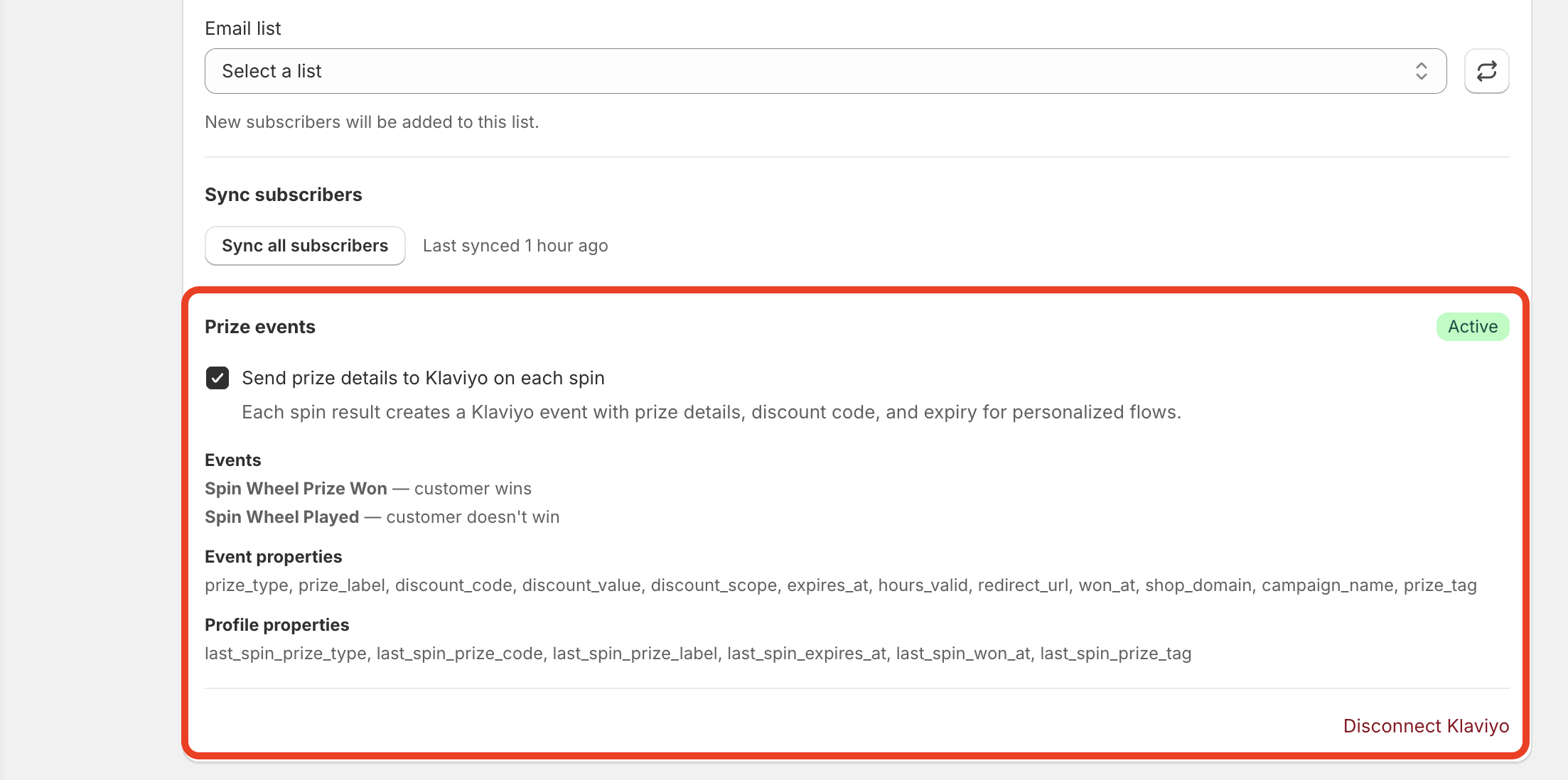
Event properties available in your flow:
prize_type prize_label discount_code discount_value discount_scope expires_at hours_valid redirect_url won_at shop_domain campaign_name prize_tag
Profile properties updated on each spin:
last_spin_prize_type last_spin_prize_code last_spin_prize_label last_spin_expires_at last_spin_won_at last_spin_prize_tag
In Klaviyo — build the confirmation email:
Create a Flow triggered by the Spin Wheel Prize Won metric
Add an email action
Pull the prize details into the email body with event variables — for example the discount code, the prize label, and the expiry:
{{ event.discount_code }},{{ event.prize_label }},{{ event.expires_at }}Set the timing (send immediately for a confirmation, or add a delay for a reminder)
Profile properties are stored on the contact, so you can also re-engage customers who won but never redeemed — the code is already saved to their profile.
Step 3 — Route each prize to its own list or tag (per slice)
Instead of sending every winner to the same list, you can route each prize to its own Klaviyo list, or attach a per-prize tag, so you can build a separate flow per prize with no manual segmentation. This is set per slice, inside that slice's discount drawer.
In PopupBoost:
Open your campaign
Go to Slices (or click a slice directly from the wheel preview)
On the slice, click Manage discount
In the drawer that opens on the right side, scroll to the bottom and open the Integration section
Under Klaviyo, choose the list and/or set the tag you want for this specific slice
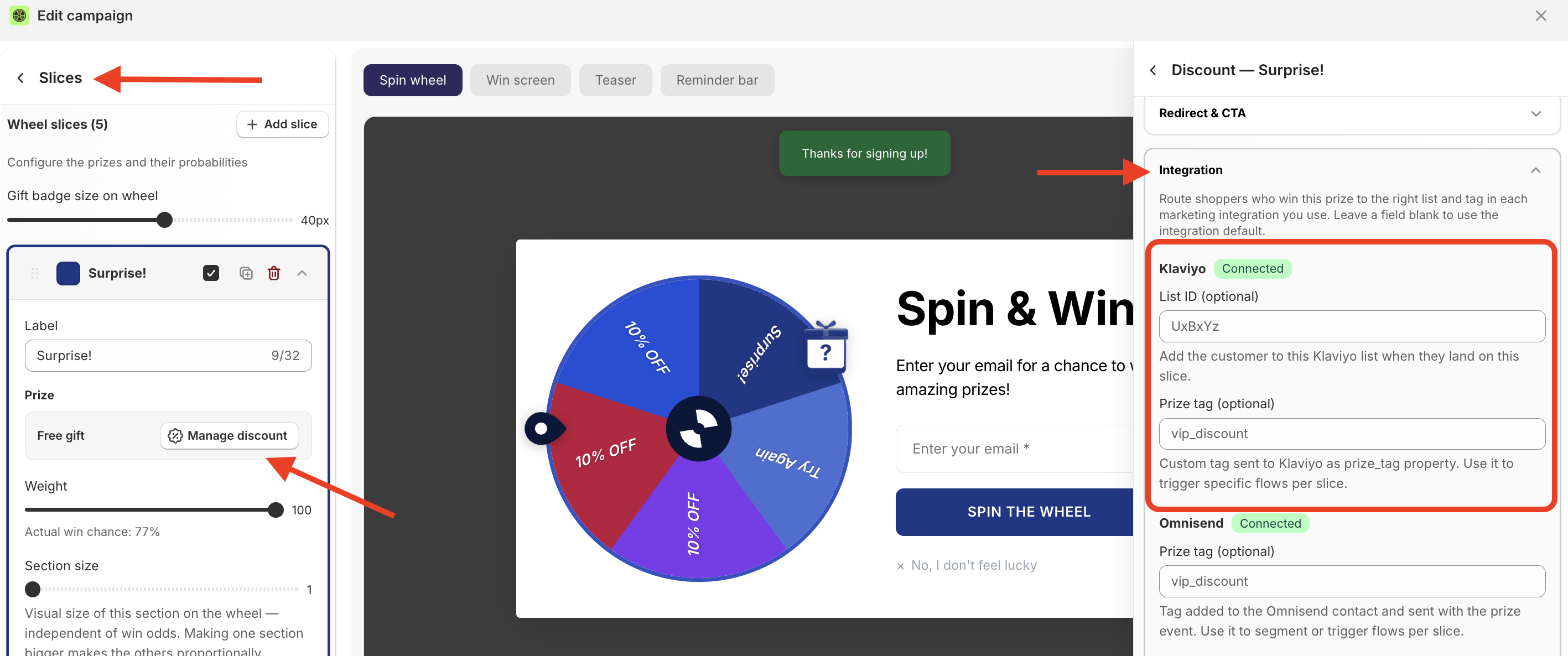
The tag you set here is sent to Klaviyo as the prize_tag property on that slice's spin events, so you can trigger a flow on prize_tag = free_gift, personalize the email per prize, and so on.
How list sync works:
Slice has no list assigned → subscriber syncs to the default list only
Slice has a list assigned → subscriber syncs to both the slice list and the default list
👉 Don't confuse these with the Shopify tags. The same discount drawer also has a Tags section with Order tag (on redemption) and Customer tag (on win) — those write tags to the Shopify order/customer, not to Klaviyo. There's also a global Customer tag (all spins) under Global Settings → Customer tagging (e.g.
2026_BF) that tags everyone who spins the campaign in Shopify. The Klaviyo list and tag live only in the Integration section.
Example
You have four winning slices: 20% off, free gift, free shipping, and "better luck next time." Give each a tag and/or its own list. In Klaviyo, build one flow per tag. Each winner gets a different email — "You won free shipping, use code FS-XXXX before midnight" — automatically, with no manual work.
Step 4 — Set a custom redirect per slice
After the win screen, you can send customers exactly where they need to go — and change the button label to match.
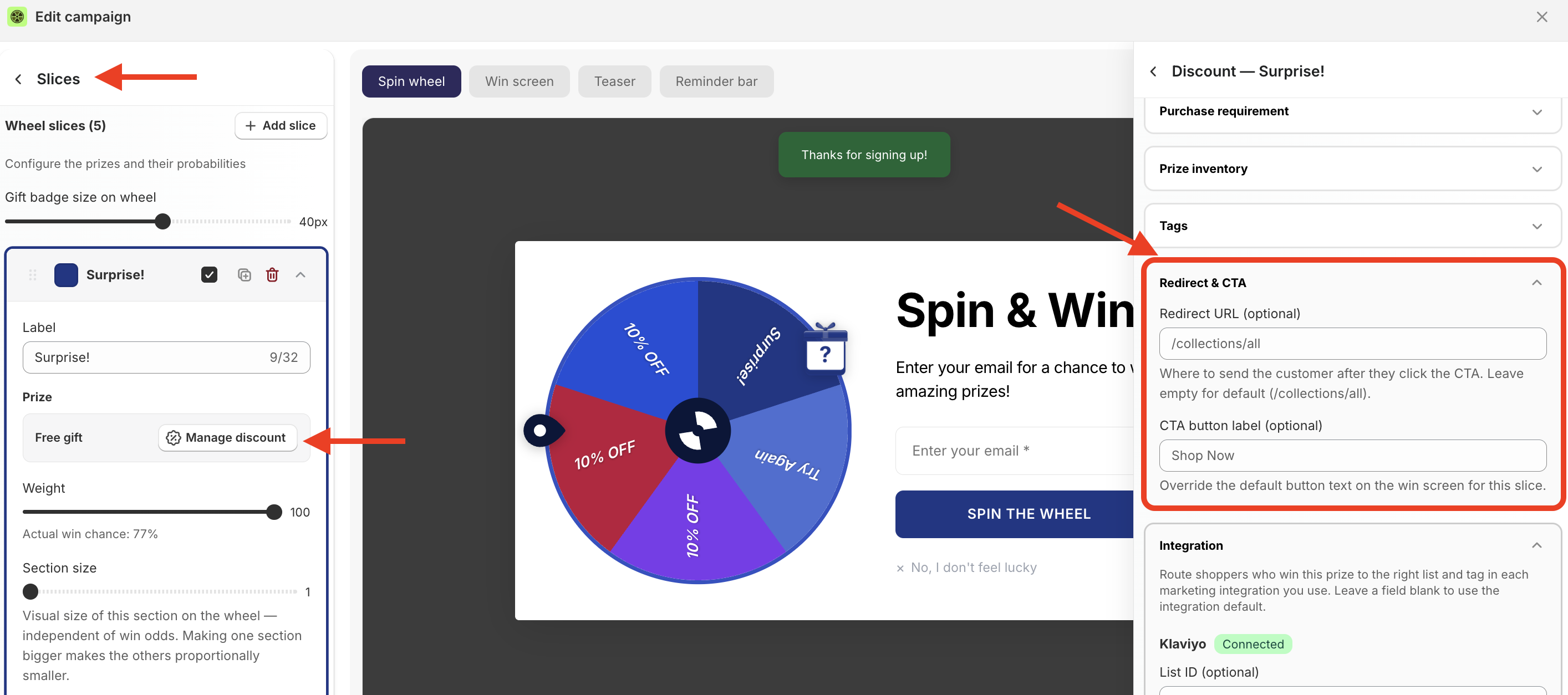
In PopupBoost → Slices → select a slice → Manage discount → Redirect & CTA:
Redirect URL — where to send the customer after they click (leave empty for default:
/collections/all)CTA button label — override the win-screen button text for this slice (default: "Shop Now")
Why this matters
Shopify doesn't allow sending a customer directly to checkout with a free gift — there must be a product in the cart first. Without a custom redirect, the winner lands on an empty cart with no clear next step.
Examples:
Free gift slice →
/products/your-gift-itemwith label "Claim your gift"20% off slice →
/collections/new-arrivalswith label "Shop the new drop"Free shipping slice →
/collections/allwith label "Start shopping"
Combining everything — full use case
Scenario: You want new and returning customers to have completely different experiences, and every winner to receive a personalized Klaviyo email with their exact prize.
Setup:
Create two campaigns — one with audience set to New customers only (0 orders), one set to Existing customers only (1+ orders)
On each slice, open Manage discount → Integration and assign a per-slice Klaviyo list and/or tag (e.g.
first_purchase_20off,loyalty_gift)Set custom redirect URLs on free gift slices to point to the gift product
In Settings → Integrations → Klaviyo, make sure Send prize details to Klaviyo on each spin is enabled
In Klaviyo, build flows triggered by the Spin Wheel Prize Won event (or by
prize_tag) — each sends a personalized email with the winner's discount code, prize label, and expiry pulled from the event properties
Result: A new visitor who wins 20% off gets an urgency email — "Your code expires in 24 hours." A returning customer who wins a free gift gets redirected to the gift product page with a "Claim your gift" button, then receives a follow-up email with their code and instructions — all without any manual work.